
The right people, with the right kit, first time
Check availability, equipment and the skills needed before agreeing a date with your customer. Assign people and equipment to the same booking, giving your team a clear view of everything planned for the visit.
Dates your customers can count on
Plan each visit around the people, equipment and qualifications the work needs. See who’s available and which equipment is already booked, so you can put everything in place before confirming a date with your customer.
Booking a two-person job with specialist equipment
- 1Tasks
The job has two tasks, and one needs a qualification you've set up as a skill.
- 2People
You add two team members and put the one who holds that skill on the task that needs it.
- 3Kit
The equipment is a bookable resource too. JobTek shows it's out on another booking that morning before you save.
- 4Sorted
You move the visit to the afternoon. The job, the customer and the notes go with it.
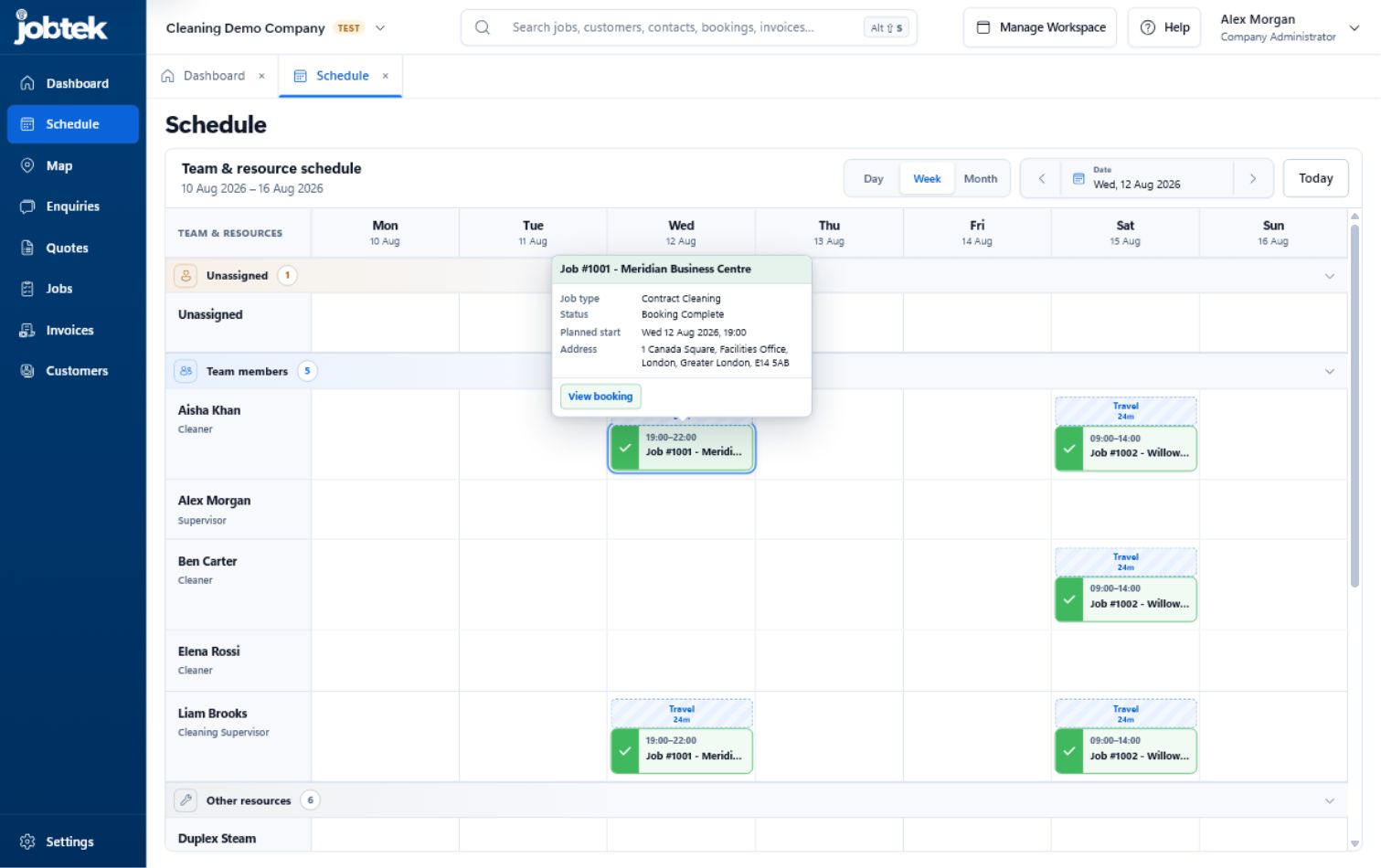
The week, with people and kit side by side
Team members and other resources share one schedule, so a van or a piece of equipment that's booked out is as easy to spot as a busy team member.
Auto Schedule finds the best fit in seconds
With JobTek Professional, Auto Schedule suggests suitable people and times for each job, ready for you to review and confirm in a click. Suggestions take into account:
Skills and expiry dates
Only people who hold the skills each task needs, valid on the day of the job.
Hours and time off
Each person's weekly hours, one-off changes, days off and company closure days.
Travel
Travel time between bookings, so every suggestion is realistic.
Existing bookings
Work already in the diary, so nobody is ever double-booked.
How a job holds together
Jobs and stages
Keep customer details, tasks, bookings, notes and files together on each job, and track its progress through the stages you choose.
On your team's phones
Give your team access to their bookings and the details they need in the app, even without a signal.
Customer updates
See your team’s status updates, such as ‘On my way’, directly on the booking. With JobTek Professional, status changes can also trigger customer emails using wording you choose.
Into billing
Create quotes, deposit requests and invoices from the same job, keeping billing connected to the work.
Questions about scheduling
Which plans include scheduling?
Jobs and the booking scheduler come with JobTek Essentials and JobTek Professional. Auto Schedule and travel estimates are part of JobTek Professional.
Can we set up our own job types and booking actions?
Yes. A job type starts each new job with your statuses, products, services and tasks. Task types hold reusable instructions, timing, the skill needed and any files to copy onto the job. You also choose the actions your team taps on a booking, such as Start travel.
Can the team see bookings in their own calendar?
Yes. Each person can create a private link in the JobTek app and subscribe from Outlook, Apple Calendar or Google Calendar, covering bookings from 30 days ago to a year ahead.
Are vans and equipment charged as users?
No. Vans and kit on the schedule are included free. You pay only for the people who sign in.
Can subcontractors be booked?
Yes. Invite them as external resources and offer them work, which they accept in the JobTek app.

Plan next week's biggest job
Try setting up a job that needs two people and a piece of equipment. JobTek highlights booking conflicts as you plan, so you can resolve them before confirming the visit.